
MSSQL Tool Gallery feed (extension)
MSSQL Tool is a free, open-source SSMS (SQL Server Management Studio) extension for SSMS 22: context-aware SQL completion, T-SQL formatting, query history and result export. A free alternative to SQL Prompt for SQL Server developers and DBAs.
▼ Download- Author
- PuLuShen
- Version
- 4.78
- Updated
- 1 hour ago
- Supports
- SSMS 22
Validation
- Most of the icon has low contrast on light backgrounds and may be difficult to see in Visual Studio's light themes.
MSSQL Tool for SSMS 22

Links
GitHub repository
https://github.com/PuLuShen/MSSQLTOOL
Latest release (ZIP + VSIX)
https://github.com/PuLuShen/MSSQLTOOL/releases/latest
SSMS Gallery (install from Visual Studio Installer style feed)
https://ssmsgallery.azurewebsites.net/extension/MSSQLTool
Documentation (Wiki)
https://github.com/PuLuShen/MSSQLTOOL/wiki
Install
- Download the ZIP from the latest release above and run
安装或重装.cmd(recommended). - Or install the newest VSIX from the SSMS Gallery above.
- Updates are built in: Settings -> Updates can schedule "install when SSMS closes".
MSSQL Tool is a free, open-source productivity extension for SQL Server Management Studio 22. It adds context-aware SQL completion, T-SQL formatting, query history, server health monitoring, and result export to Excel/Google Sheets/email. Built for SQL Server developers and DBAs who want faster query writing and richer result processing inside SSMS.
MSSQL Tool is a fork of Axial-SQL/AxialSqlTools (Apache-2.0). The SQL completion engine, the formatter options, and the settings and localization layers were reworked on top of it.
Highlights
- Full bilingual UI (中文/English) - most SSMS extensions are English-only.
- Free alternative to SQL Prompt for SQL completion, T-SQL formatting, query history, and result export to Excel/email.
- Built on Axial SQL Tools (maintained since 2016), with an enhanced completion engine and localization.
Note: Google Sheets export and GitHub script sync are experimental and under active development.
Screenshots
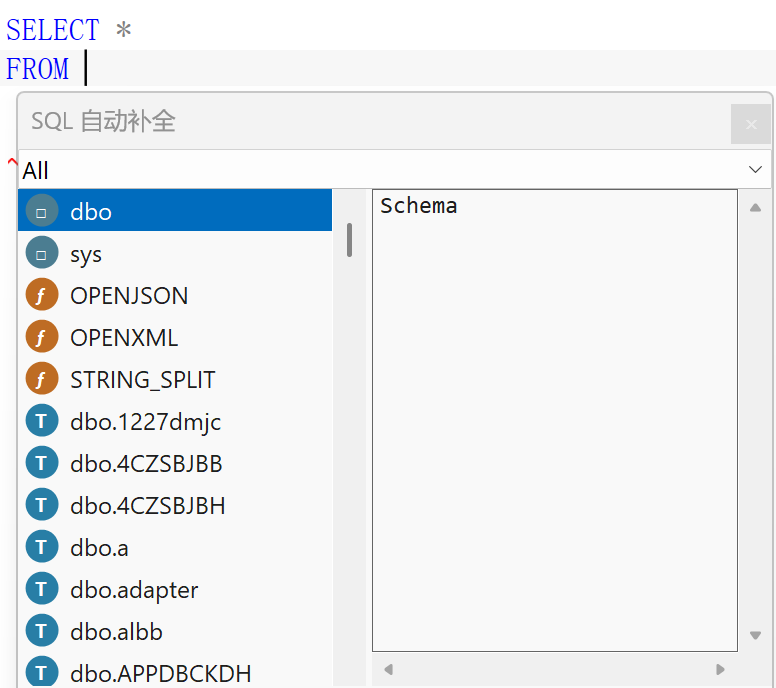
Smart SQL completion - context-aware suggestions while you type: schemas, tables, views, columns, procedures, functions and parameters, each with a kind icon, a category filter and the details of the highlighted object.
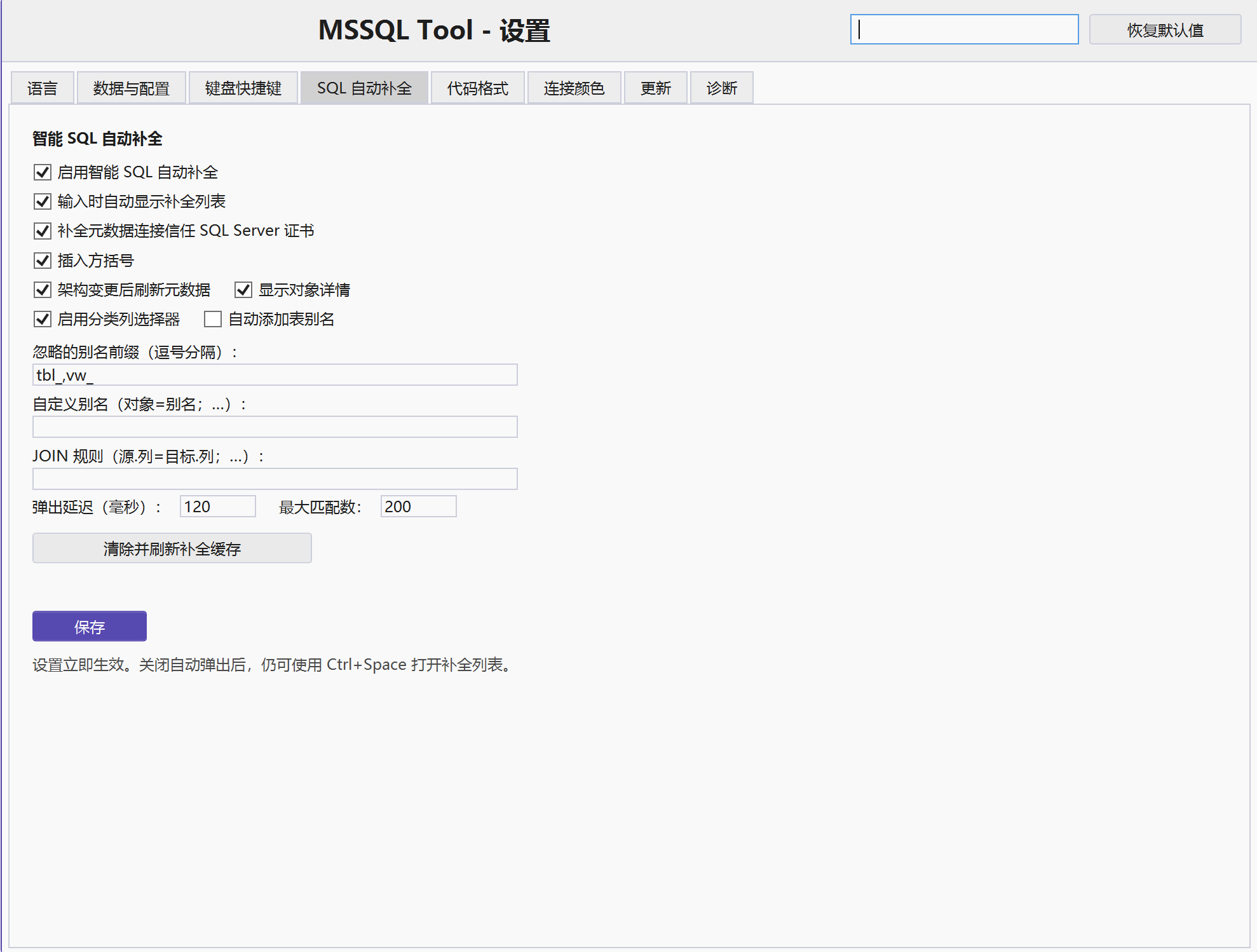
Settings - every feature has its own options and is saved immediately. The interface follows the SSMS language (Simplified Chinese shown here, English is available too).
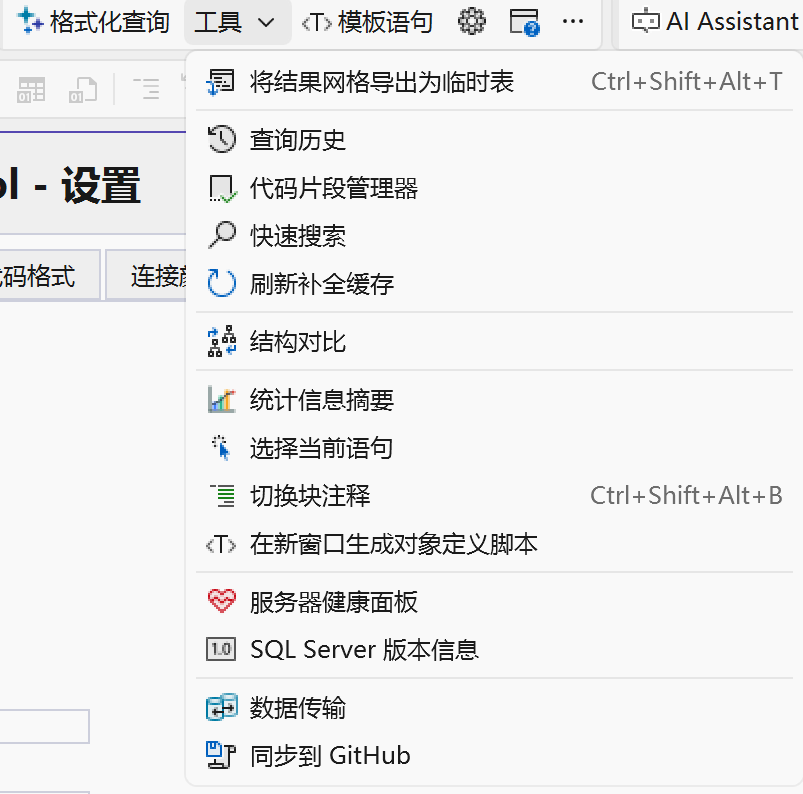
Tools menu - the extension's commands, with their keyboard shortcuts where one is configured.
Features
SQL editing
- Smart SQL completion: Context-aware suggestions for databases, schemas, tables, views, columns, procedures, functions, parameters, synonyms, and linked-server objects.
- Completion metadata cache: Background loading, manual clear/refresh, loading status feedback, and optional SQL Server certificate trust.
- F12 Go to Definition: Opens database object definitions and navigates to local SQL definitions.
- T-SQL formatting
- Query templates and snippets
- Expand
SELECT *to a column list - Select current statement
- Toggle block comments
- Quick Search
- Script object definition
Result processing and data transfer
- Export grid to Excel
- Send grid results by email
- Export grid as a temporary table
- Copy grid column names and values as INSERT, CSV, JSON, XML, or HTML
- Bulk data transfer
Monitoring and workflow
- Query History
- Server Health Dashboard
- Execution statistics summary
- Transaction and Always Encrypted warnings
- Connection colors for server and database environments
- Millisecond query execution time
- Right-aligned numeric grid values
- SQL Server version information
- Configurable data and settings folder (another drive, a synced folder or a portable device)
Experimental features
These work, but their design is still moving: expect changes between releases and re-check the related settings after upgrading.
| Feature | Status |
|---|---|
| Google Sheets export | Beta - OAuth setup and column mapping are still changing. |
| GitHub script sync | Beta - whole-file push and pull, conflict resolution is manual. |
Formatting
SSMS 22 ships its own T-SQL formatter, so the formatting feature of this extension is no longer developed. The command still works and is kept for existing habits - it now lives in the Tools menu (Ctrl+Shift+Alt+F) - but new formatting options will not be added.
Support

FAQ
What is MSSQL Tool? A free SSMS 22 extension for SQL completion, formatting, and result processing.
Is MSSQL Tool free? Yes, it is open-source under Apache-2.0.
How does it compare to SQL Prompt or dbForge? MSSQL Tool is free and open-source, with built-in GitHub sync and Google Sheets export. SQL Prompt and dbForge are commercial alternatives.