
SSMS EnvTabs Gallery feed (extension)

Auto-color and rename SSMS query tabs based on connection/server rules.
▼ Download- Author
- Blake Becker
- Version
- 2.2.3
- Updated
- 4 months ago
- Supports
- SSMS 22
 SSMS EnvTabs
A Visual Studio Extension for SQL Server Management Studio (SSMS) that automatically names query tabs and leverages SSMS's native regex feature to color them based on server and database connections. Keep your production, QA, and development environments visually distinct and easily identifiable.
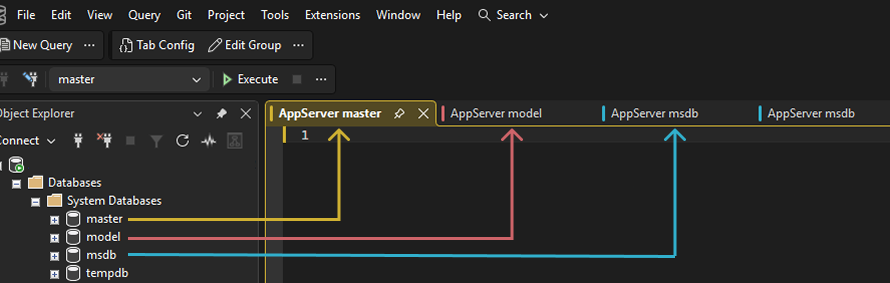
Note: This image shows tabs grouped by server and database. If you prefer grouping by server only, see
Auto configure modein Config Guide



Key Features
- Color-Coded Tabs - 16 distinct colors to visually separate different environments
- Editor Tint - Optionally blend the group color into the query editor background (off by default,
initialEditorTint/ per-groupenableEditorTint, intensity viaeditorTintStrength, 1-30%, default 8). The Connection Groups tab previews enabled tints. - Tab Renaming - Automatically name query tabs with environment names (e.g., "1. Prod", "1. QA")
- Auto-Configuration - Automatically create rules for new connections (retained between sessions)
- Manual-Regex - Add your own regex that you want applied to the ColorByRegexConfig.txt file (retained between sessions)
Install
Download the latest .vsix from GitHub Releases and run the installer. Follow the set up guide from the Wiki.
On-Demand Configuration
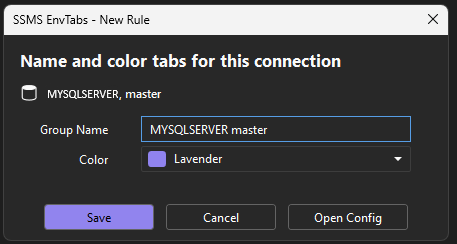
When you connect to a server or database that doesn't have a matching rule, EnvTabs will prompt you to configure it. This ensures you only create rules for the connections you actually use!
Documentation
Full documentation is available in the Wiki.
- Installation: Install and setup.
- Configuration: Global settings and prompts.
- Tab Appearance: In depth tab appearance guide.
- Color Reference: List of available colors (0-15).
- How it Works: Technical details.
Author
Blake Becker
If you find this extension helpful, please consider giving it a star!