
VS Pets Gallery feed (extension)

Bring your Visual Studio to life with adorable animated pets that walk along your status bar!
▼ Download- Author
- Mads Kristensen
- Version
- 1.0.55
- Updated
- 1 month ago
- Tags
- fun, pets, cat, dog, fox, clippyy
- Supports
- VS 2022 VS 2026 VS 2022 (ARM64) VS 2026 (ARM64)
VS Pets 🐱🐕🦊


Bring your Visual Studio to life with adorable animated pets that walk along your status bar!
Watch cats, dogs, foxes, and more stroll across the bottom of your IDE while you code. Your pets have unique personalities—they walk, run, sleep, and even react to your builds!
Download from the Visual Studio Marketplace or install from within Visual Studio via Extensions > Manage Extensions.
✨ Features
🐾 Animated Companions
Your pets come to life with smooth walking animations. Watch their little legs move as they explore your status bar!

🎉 Build Awareness
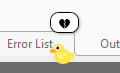
Your pets celebrate with you! They show 🎉 when builds succeed and 😢 when they fail.
Build succeeded:

Build failed:
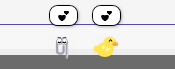
👋 Social Pets
When two pets meet, they greet each other with a friendly wave! Each pet has its own personality with different speeds and behaviors.
🎨 Multiple Pet Types
Choose from a variety of pets:
- 🐱 Cats - Orange, black, white, gray, and brown
- 🐕 Dogs - Various colors including Shiba Inu style
- 🦊 Foxes - Classic orange and arctic white
- 🐺 Wolves - Gray, white, and dark gray - majestic and loyal!
- 🐻 Bears - Brown grizzly, black bear, and white polar bear
- 🦎 Axolotls - Pink, blue, gold, white, and black
- 🐢 Turtles - Green, brown, and gray - slow and steady!
- 🐰 Bunnies - White, brown, gray, and more - fluffy tails!
- 🦝 Raccoons - Gray and dark gray trash pandas with masks
- 🦖 T-Rex - Green, brown, purple, red - tiny arms, big personality!
- 📎 Clippy - The legendary Office assistant returns!
- 🦆 Rubber Duck - Multiple colors: yellow, white, black, blue, pink, gold, and orange
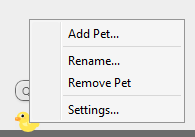
🖱️ Easy Interaction
Right-click any pet to:
- Add Pet - Quickly add another companion
- Rename - Give your pet a custom name
- Remove - Say goodbye (they'll wave! 👋)
- Settings - Access VS Pets options
⚙️ Fully Configurable
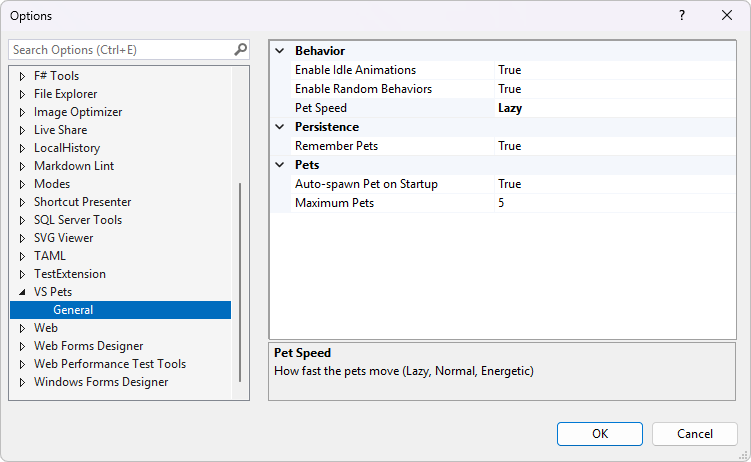
Access settings via Tools > Options > VS Pets:
- Auto-spawn on startup
- Pet speed (Lazy → Hyper)
- Idle animations toggle
- Random behaviors toggle
- Session persistence
🚀 Getting Started
- Install the extension from Visual Studio Marketplace
- A pet will automatically appear on your status bar
- Right-click the pet to add more friends!
- Access Extensions > VS Pets menu for more options
🎮 Pet Behaviors
Your pets aren't just decorations—they have personality!
| Behavior | What happens |
|---|---|
| 🚶 Walking | Pets stroll across the status bar |
| 🏃 Running | Sometimes they get energetic! |
| ⚾ Chasing | Double-click to throw a ball - pets chase it! |
| 💤 Sleeping | Pets take naps with Zzz bubbles |
| 🥱 Yawning | Random idle behavior |
| 😌 Stretching | Pets stay limber |
| 👀 Looking around | Curious pets explore |
| 🐾 Ear twitch | Subtle idle animations |
| 😊 Tail wag | Happy pets wag their tails |
💡 Tips
- Double-click a pet to throw a ball and watch them chase it!
- Drag pets to reposition them along the status bar
- Pets remember their names across Visual Studio sessions
- White pets have outlines so they're visible on light themes
- Pets walk off-screen and re-enter from either side
- Each pet is unique with slightly different speeds and behaviors
- Hover over a pet to see their name
⚡ Performance
- Pets use lightweight sprite sheets rendered in the background; there is no 3D pipeline, shaders, or heavy GPU work.
- Animation frames are tiny images composited over the status bar, so CPU and memory impact stay minimal even with several pets running.
🤝 Contributing
Found a bug or have a feature request? Please open an issue on GitHub.
Want to add a new pet type? Pull requests are welcome!
🙏 Acknowledgements
This extension was inspired by VS Code Pets by Anthony Shaw (tonybaloney). VS Code Pets is a fantastic extension that brings pets to VS Code's explorer panel with throwable balls and themed backgrounds.
VS Pets takes a different approach—pets walk along the Visual Studio status bar and react to your builds. Double-click any pet to throw a ball and watch them chase it!
Check out VS Code Pets if you're a VS Code user!
Made with ❤️ for developers who appreciate a little joy in their IDE.